Home Security for New Homeowners: Move-In Guide
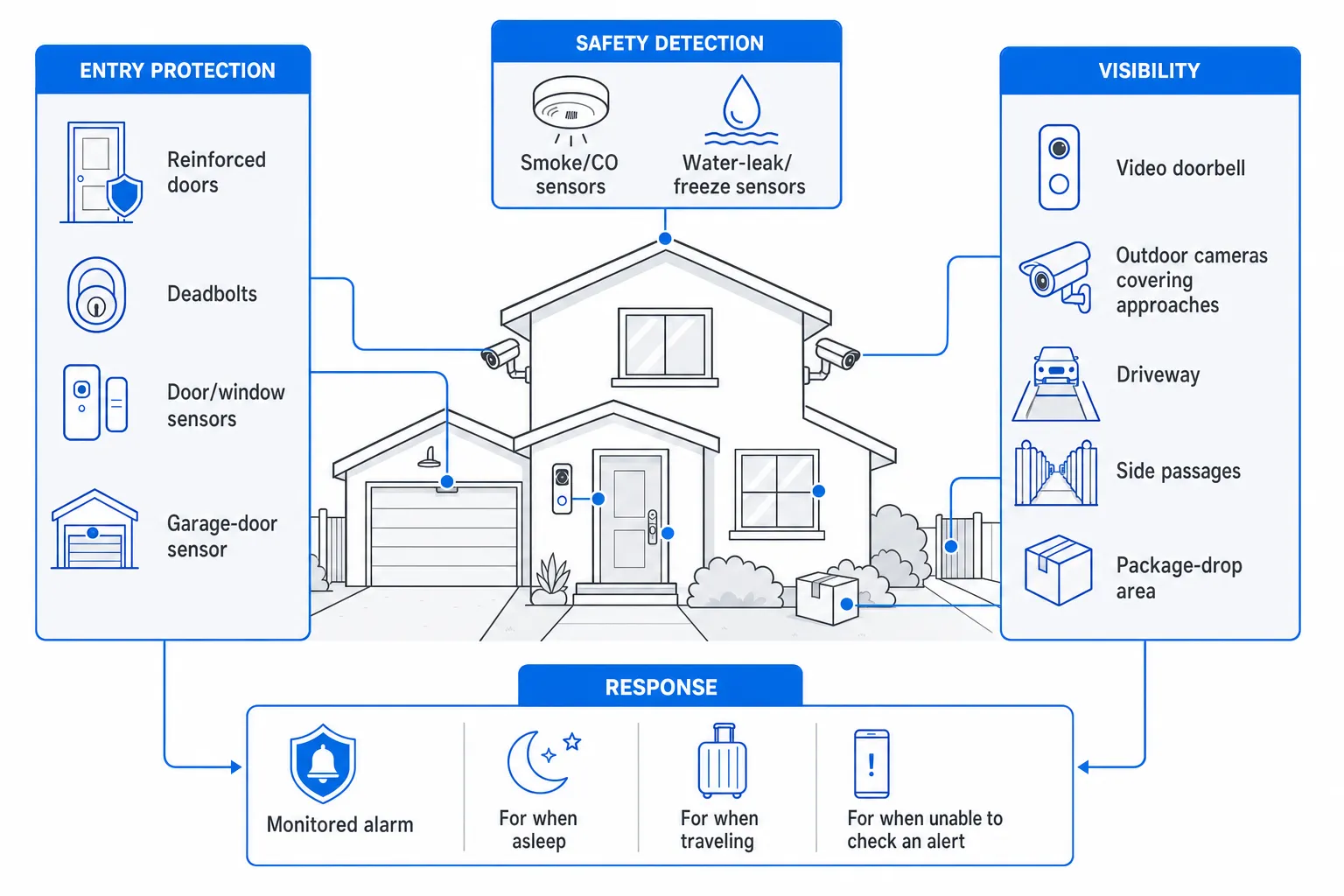
Home security for new homeowners starts with layered protection: rekeyed locks, secure access codes, a video doorbell, entry sensors, outdoor cameras, and smoke and carbon monoxide detection. Begin with the front door, garage, first-floor windows, driveway, and package area, then choose self-monitoring or 24/7 professional monitoring based on your risks and budget.
Key takeaways
- Secure inherited locks, garage access, keypad codes, Wi-Fi credentials, and smart-home accounts before moving valuables inside.
- Audit existing cameras, alarms, sensors, and hubs instead of assuming equipment left by the previous owner is safe or supported.
- Compare the full cost of equipment, installation, monitoring, contracts, cancellation, and cloud video before choosing a system.
- Protect packages, vehicles, side gates, and dark pathways, not just the front door.
The Best Home Security Setup for a New Homeowner
Your new home needs more than one camera. A strong setup layers physical protection, visibility, detection, and response. That way, a locked door is supported by an alert, a camera view, and a plan for what happens when you are away.
Start with these priorities:
- Entry protection: Reinforced exterior doors, quality deadbolts, door and window sensors, and a garage-door sensor.
- Visibility: A video doorbell and outdoor cameras covering approaches, the driveway, side passages, and package-drop area.
- Safety detection: Smoke and carbon monoxide sensors, plus water-leak or freeze sensors where the property needs them.
- Response: A monitored alarm if you want trained operators to help respond when you are asleep, traveling, or unable to check an alert.
Prioritize the front door, garage, first-floor windows, driveway, and delivery area before adding indoor cameras or specialty sensors. Indoor cameras can be useful, but privacy preferences vary. You should not record more than you need.
Security is also a leading smart-home priority for buyers. In 2025, Zillow Research, Consumer Housing Trends Report 2025 found that 72% of prospective buyers rated security features important. That makes move-in security a practical first project, not an optional upgrade.
Your Move-In Home Security Checklist
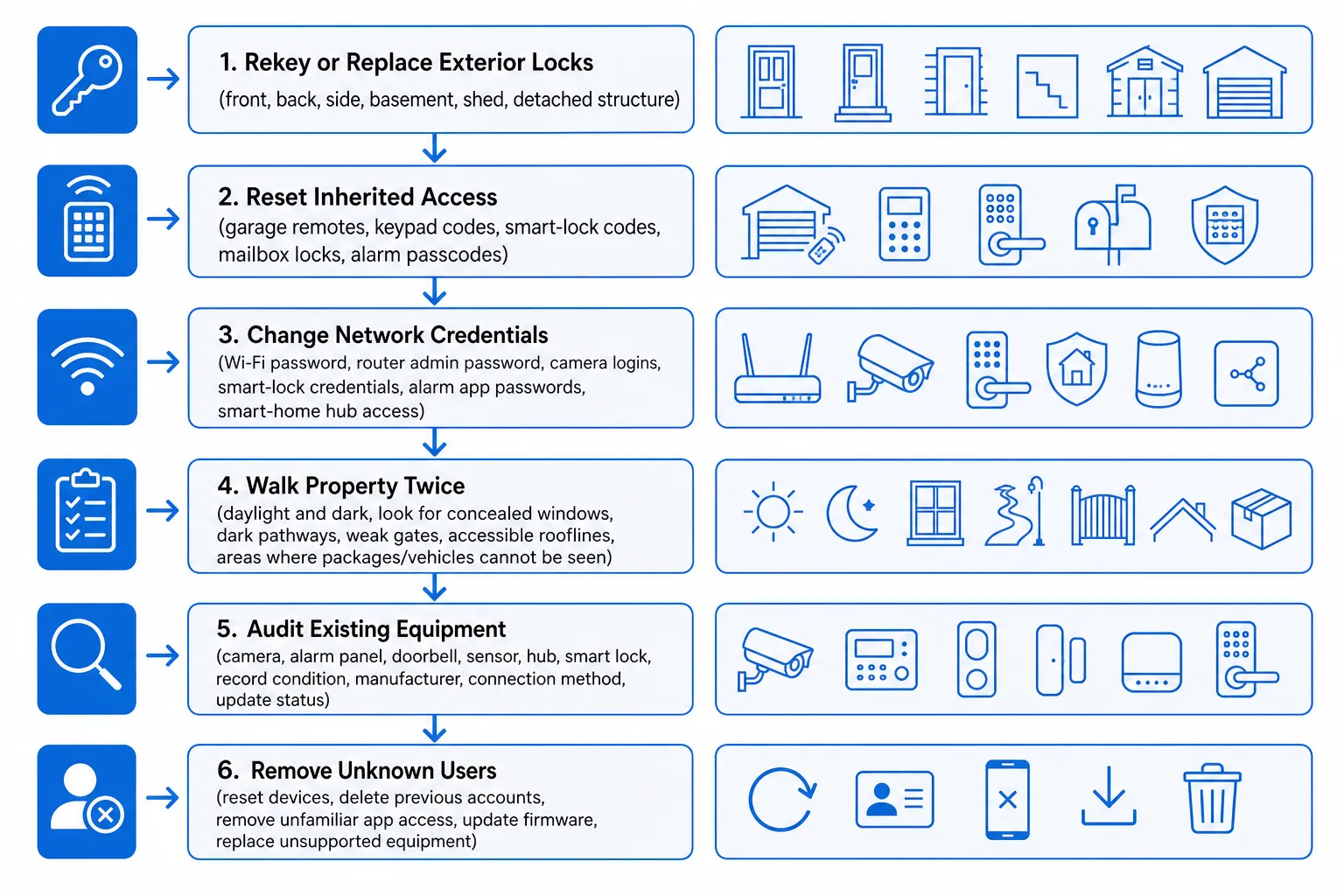
The first security audit should happen before you unpack valuables. You do not know who still has a key, code, app login, garage remote, or access to equipment left behind.
- Rekey or replace exterior locks. Include the front door, back door, side door, basement, shed, and any detached structure. Rekeying can preserve the existing hardware while ensuring old keys no longer work.
- Reset inherited access. Replace garage-door remotes, keypad codes, smart-lock codes, mailbox locks, and alarm passcodes. Never assume previous occupants removed every user.
- Change network credentials. Set a new Wi-Fi password and router administrator password. Then update camera logins, smart-lock credentials, alarm-app passwords, and smart-home hub access.
- Walk the property twice. Inspect it during daylight and after dark. Look for concealed windows, dark pathways, weak gates, accessible rooflines, and areas where packages or vehicles cannot be seen.
- Audit existing equipment. Identify every camera, alarm panel, doorbell, sensor, hub, and smart lock. Record its condition, manufacturer, connection method, and whether it still receives updates.
- Remove unknown users. Reset devices securely, delete previous accounts, remove unfamiliar app access, update firmware, and replace unsupported equipment.
- Test before relying on it. Open protected doors and windows, trigger camera notifications, test smoke and carbon monoxide alerts according to manufacturer instructions, and confirm that every household member knows what to do.
Which Security Equipment Do You Need?
Choose equipment according to how people move around your property. A small townhouse may need a doorbell, entry sensors, and one outdoor camera. A larger home may need coverage at the driveway, side gate, garage, rear door, and detached structures.
- Video doorbell: Use it to see visitors and monitor the primary delivery area. Choose a model with the power option, recording plan, and notification controls that fit your home.
- Door and window sensors: Place them on exterior doors, accessible first-floor windows, basement entries, and other openings you want to monitor.
- Glass-break detection: Consider it for rooms with several windows or vulnerable glass doors, especially where placing individual sensors is impractical.
- Outdoor cameras: Cover approaches, the driveway, side passages, and package zones. Angle them to limit unnecessary recording of neighbors and private areas.
- Smart lock: Look for unique temporary codes, automatic locking, activity alerts, and a physical-key fallback. Keep permissions limited and current.
- Environmental sensors: Add smoke, carbon monoxide, water-leak, or freeze detection according to the property’s risks and your insurance or household needs.
Do not point every camera at the front door. A camera that misses the side path or garage approach leaves a predictable gap. Walk the property and ask what a visitor, delivery driver, or intruder could reach without being seen.
How to Compare Home Security Systems
The lowest advertised monthly price rarely tells you the whole cost. Compare the equipment, installation, activation, monthly monitoring, cloud-video storage, replacement, and cancellation charges together.
| What to compare | Questions to ask |
|---|---|
| Equipment | Which cameras, sensors, locks, hubs, and backup components are included? |
| Installation | Is it DIY, professionally installed, or available either way? Are extra labor or wiring charges possible? |
| Monitoring | What does 24/7 monitoring cover? Does it include burglary, fire, environmental alerts, and cellular outages? |
| Contract | How long is the agreement? Does it renew automatically? Can the price change? |
| Cancellation | What notice is required? Are there cancellation fees, equipment balances, or relocation rules? |
| Ownership | Do you own the equipment? Will it continue working if monitoring ends? |
| Privacy and app | Can you control users, recording, notifications, automation, and video retention? |
For a side-by-side starting point, compare ADT, Ring, and SimpliSafe on equipment, monitoring flexibility, installation, automation, and long-term cost. Brand familiarity should not replace a careful review of contract terms.
If you are already dealing with rising prices, a long contract, cancellation fees, or old equipment, read your current agreement before switching. Confirm the end date, notice requirements, remaining balance, equipment ownership, and whether any existing devices can be reused.
Self-Monitoring, Professional Monitoring, or Both?
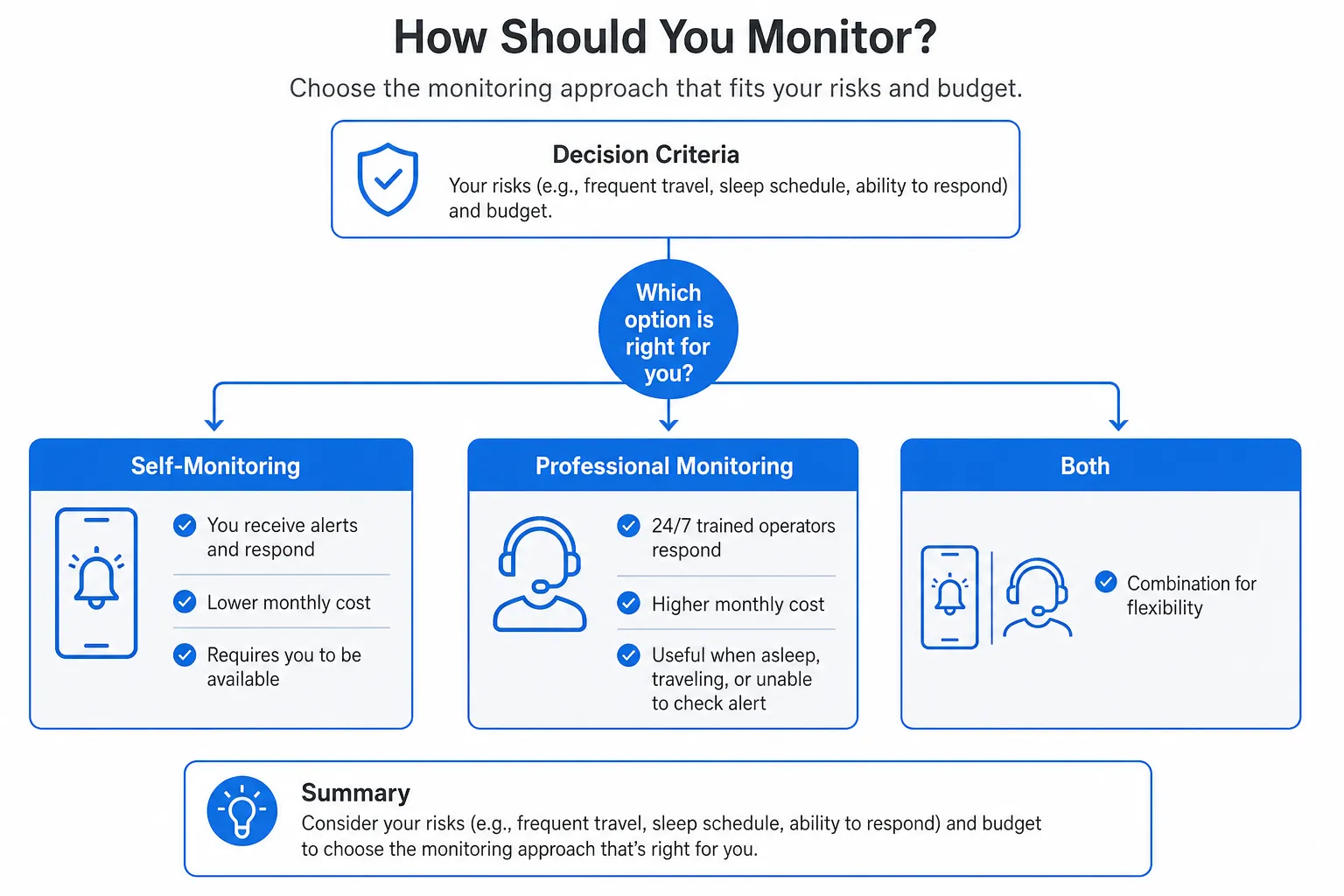
Self-monitoring can suit homeowners who want lower recurring costs and are comfortable checking alerts, reviewing cameras, and contacting emergency services themselves. It gives you control, but it also makes your phone, internet connection, and availability part of the response plan.
Professional monitoring can make sense when you travel, sleep through notifications, have unreliable phone access, or want trained operators to help verify and escalate alarms. Ask whether operators can handle burglary, fire, medical, water, freeze, and other environmental alerts.
You can also combine professional monitoring with app access and cameras. That gives you visibility while trained operators provide another response layer. Confirm how false alarms, emergency contacts, permits, and cellular or battery backup are handled.
Professional installation helps when wiring, sensor placement, camera angles, or smart-lock integration are complicated. DIY installation may offer more flexibility for a straightforward setup. Either way, test every sensor and camera after installation.
Protect Packages, Cars, and the Property Beyond the Front Door
New homeowners often focus on the front entrance and overlook deliveries, vehicles, tools, and side access. Your security plan should cover the entire property.
Package theft deserves specific attention. One 2025 analysis estimated that 29.7% of U.S. households experienced package theft during the previous 12 months. The same Omnisend U.S. Porch Piracy Report 2025 estimated approximately 228 million packages stolen and $12.8 billion in losses.
- Secure deliveries: Use a doorbell camera, delivery instructions, motion lighting, a locked parcel box, or a secure pickup location.
- Cover the driveway: Position a camera toward the driveway and street-facing approach. Keep vehicle interiors empty and remove garage remotes from parked cars.
- Reduce hiding places: Trim concealment near doors and windows. Secure side gates and store ladders, tools, and other climbing aids indoors.
- Use lighting thoughtfully: Add motion or scheduled lighting to dark pathways, the garage approach, and the side of the home.
- Protect garage access: Keep the interior door locked, monitor the garage door, and avoid leaving registration documents or spare keys inside vehicles.
Visible cameras and alarms work best as part of a broader layer of locks, lighting, privacy practices, and neighbor awareness. They do not replace basic physical security.
How to Start Without Overpaying
Start with a room-by-room risk map. Mark exterior doors, accessible windows, the garage, driveway, package area, dark pathways, and any detached structure. Then list inherited equipment and decide which problems require immediate action.
- Secure access first. Rekey locks, replace codes, change passwords, and remove unknown users.
- Choose essential coverage. Protect the primary doors, garage, first-floor windows, driveway, and delivery area.
- Choose your response model. Decide between DIY installation, professional installation, self-monitoring, professional monitoring, or a combination.
- Request a detailed quote. Home Security Quotes can provide a free, no-obligation quote tailored to your home’s entry points and household routines, including optional professional installation and 24/7 monitoring.
- Test and expand. Check alerts, camera views, codes, battery life, emergency contacts, and household comfort before adding more devices.
Home Security Quotes can also help you compare ADT, Ring, and SimpliSafe when you are replacing an older system or evaluating an alternative. Keep the focus on coverage, flexibility, privacy, and total cost rather than a familiar name.
Your Next Move-In Security Step
The best first step is simple: change every inherited credential and rekey every exterior lock before you finish unpacking. Then map your highest-risk entry points and request a written comparison for the equipment and monitoring those areas need.
Frequently asked questions
What is the first thing a new homeowner should do for home security?
Yes, the first step is to rekey or replace all exterior locks, including front, back, side, and garage doors. This ensures no previous owner, tenant, or contractor retains access, which is critical before moving in valuables.
How much does a basic home security system cost for a new house?
A basic system typically costs $200 to $600 for equipment, plus $10 to $50 monthly for monitoring. Prices vary based on the number of sensors, cameras, and whether you choose self-monitoring or professional services.
Do I need professional monitoring for my new home security system?
No, professional monitoring is optional and depends on your lifestyle and risk tolerance. It provides 24/7 response when you're asleep or away, but self-monitoring with smartphone alerts can be sufficient for lower-risk situations.
Can I use the existing security equipment left by the previous homeowner?
Yes, but only after a full audit and reset. Check if devices are supported, update firmware, delete old accounts, and test all sensors and cameras. Unsupported or outdated equipment should be replaced for reliable protection.
What are the most important areas to secure in a new home?
Prioritize the front door, garage, first-floor windows, driveway, and package delivery area. These are the most common entry points and vulnerable spots, so start with locks, sensors, and cameras there before adding indoor coverage.